LS Series SCARA Robots featuring Gyroplus TechnologyGyroplus technology found in LS Series SCARA robots can help improve cycle time and improve workcell performance
LS Series featuring optional Integrated SolutionsOptional integrated solutions (Vision Guide, Force Guide, Intelliflex Flexible Feeding) are available with LS Series SCARA Robots. Fully integrated into RC+ Software, integrated solutions can help save integration time, reduce costs and simply support.
Epson EcoTank ET-2900 / ET-2903 | Cleaning the PrintheadLearn how to clean the printhead on your Epson EcoTank ET-2900 or ET-2903 printer. Questions? Visit support.epson.com/et2900 (ET-2900) or support.epson.com/et2903 (ET-2903). 00:00 Introduction 01:06 Checking the Nozzles 02:19 Cleaning the Printhead 04:41 Power Cleaning
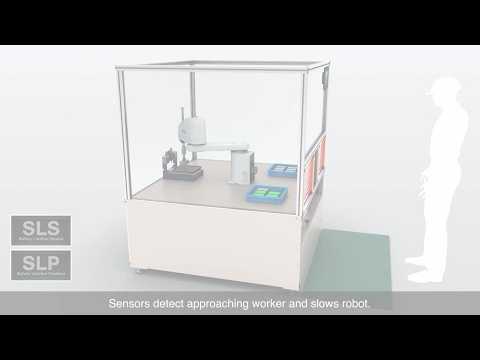
LS Series SCARA Robots Featuring SafeSense TechnologySafeSense Technology, featured on LS Series SCARA Robots, can allow workers to enter into a moving robots workspace without the robot stopping (with a proper risk assessment). This can help increase user interaction without a loss of productivity.
Epson EcoTank ET-4903 | Cleaning the PrintheadLearn how to clean the printhead on your Epson EcoTank ET-4903 printer. Questions? Visit support.epson.com/et4903 00:00 Introduction 01:01 Checking the Nozzles 02:10 Cleaning the Printhead 04:35 Power Cleaning
FastFoto Scanners | Therese Cranick
Epson FastFoto | SweetandTidy
FastFoto Scanners | Shaq
FastFoto Scanners | Rachel Pitzel
Lifestudio Portable Projectors | Caroline Hamburg
Epson Q-Series 4K HDR Laser Projectors | Taking USC Basketball to the Next LevelSee how Epson, Stewart Filmscreen and Digital Installers worked together to transform viewing experiences across USC Basketball facilities. By pairing Epson Q-Series projectors with Stewart screens, the installations deliver bright, clear, immersive images—even in well-lit spaces.
Shaq's Home Theater - Epson Q-Series 4K HDR ProjectorsCheck out Shaq's upgraded home theater featuring multiple Epson Q-Series high lumen 4K HDR laser projectors.
Epson Q-Series Projector Comparison – Epson QL-3000 vs JVCWatch Epson Technical Sales Manager Rob Brennan compare Epson Q-Series projectors with competing models. See how Epson Q-Series performs in the side-by-side demonstration.
Epson Home Cinema LS5000 | Projector TourMeet the Epson Home Cinema LS5000, Epson’s next generation of 4K HDR digital projection featuring Epson's proprietary 3-Chip 3LCD technology for bright, sharp images, accurate color and deep black levels.
Epson Home Cinema LS6000 | Projector TourMeet the Epson Home Cinema LS6000, Epson’s next generation of 4K HDR digital projection featuring Epson's proprietary 3-Chip 3LCD technology for bright, sharp images, accurate color and deep black levels.
Epson Home Cinema LS7500 | Projector TourMeet the Epson Home Cinema LS7500, Epson’s next generation of 4K HDR digital projection featuring Epson's proprietary 3-Chip 3LCD technology for bright, sharp images, accurate color and deep black levels – Including a unique short-throw lens.
Epson Home Cinema LS11000 | Projector TourMeet the Epson Home Cinema LS11000, Epson’s premium 4K HDR digital projector featuring Epson's proprietary 3-Chip 3LCD technology for bright, sharp images, accurate color and deep black levels.
Transform an Ordinary Room into an Epic Epson Home CinemaWith an Epson Home Cinema 4K HDR projector, you can transform virtually any room in your house into an epic home theater experience. Perfect for movies, gaming, and live sports.
ColorWorks CW-D3800 | How to Load Fanfold PaperLearn how to load fanfold paper into your Epson ColorWorks CW-D3800 Color Label Printer. Follow along to attach the paper feed guide, adjust the platen shutters and paper guides, feed the fanfold paper, and confirm the printer is ready to print. For more information, please visit epson.com/colorworks-color-label-printers
ColorWorks CW-D3800 | How to Set Up the Printer DriverSet up the printer driver for your Epson ColorWorks CW-D3800 Color Label Printer. This step-by-step tutorial shows you how to configure media settings, select print quality options, adjust auto-cut settings and perform a test print. For more information, please visit epson.com/colorworks-color-label-printers
ColorWorks CW-D3800 | How to Set Up the Mac DriverLearn how to set up your Epson ColorWorks CW-D3800 Color Label Printer for printing from a Mac. This step-by-step tutorial shows you how to add the printer, configure media and custom paper sizes, adjust print quality and auto-cut options and save frequently used settings as presets. For more information, please visit epson.com/colorworks-color-label-printers
ColorWorks CW-D3800 | How to Set Up the PrinterLearn how to set up your Epson ColorWorks CW-D3800 Color Label Printer. Follow along to configure the initial settings, install the included ink cartridges and complete ink charging. For more information, please visit epson.com/colorworks-color-label-printers
ColorWorks CW-D3800 | How to Load Roll PaperLearn how to load roll paper into your Epson ColorWorks CW-D3800 Color Label Printer. Follow along to properly position the paper, adjust the guides and platen shutters, and confirm the printer is ready to print. For more information, please visit epson.com/colorworks-color-label-printers
ColorWorks CW-D3800 | One Label Printer. Many Applications.Discover the ColorWorks CW-D3800 On-demand Color Badge and Label Printer, a compact, versatile solution designed to streamline visitor management, to-go orders, item labeling and more. Featuring PrecisionCore Heat-Free technology, high-speed printing, spot color matching and a standard autocutter, it delivers productive performance and high-quality color labels across a variety of applications.


 CRONOLOGICO
 AUTORI POST